
Rethinking Reporting for Threat Analysts
What started as a request to improve report editing turned into a complete rethink of how analysts create, structure, and share intel.

Overview
The ThreatQ platform was strong at helping cyber threat teams investigate and connect intelligence, but was lacking in support when analysts needed to share that work. Analysts often had to leave the platform, manually reshape content, and rely on outside tools to turn their findings into stakeholder-ready reports.
That mattered because without reporting analysts were unable to turn investigations into something the rest of the organization could actually use. If ThreatQ forced that step into other tools, it risked becoming just one part of a fragmented workflow.
What I found through customer validation was that this wasn't just an editing problem, reporting had become a manual, repetitive operational task. Analysts were rebuilding the same reports from scratch for different audiences every time.
That reframing shaped the solution:
I designed a native reporting workflow built around reusable templates and guided setup to eliminate the manual rebuild loop. Paired with ThreatQ's AI briefing agent, it went from a useful feature to a power tool.
What I lead
Reframed reporting from an editing issue to a repeated workflow problem, validated customer needs, defined the workflow, and helped get the initiative prioritized.
Outcome:
During validation, customers consistently estimated a 40% reduction in reporting time across multiple teams.
The Problem
ThreatQ’s existing reporting workflow was essentially a PDF export of an object details page. The output mirrored the same metadata and content shown in the product, but it was static and not designed for real report creation.
Object Details Page
Designed for investigation, not sharing.

Exported PDF
Same structure as the product - no editing, no flexibility.
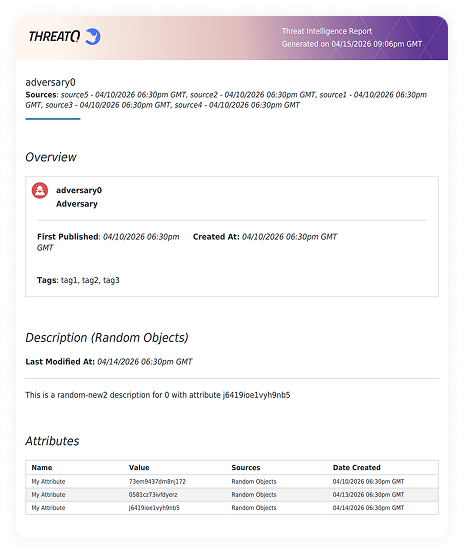
Users had very limited control over the output beyond light top-level customization like company branding and colors.
In practice, the description field became the main way to shape the report, and users often had to strip away other sections just to make the export feel usable.
For some users, this was good enough. But for more mature teams with more complex reporting needs, the export quickly broke down.
Description field workaround
Analysts used the description field to write their analysis

Limited export controls
Outside of hiding sections, users had no control over the output.

Why now?
Reporting had been a known gap for some time, but it kept getting deprioritized.


How the Problem Changed Through Validation
At first, I framed the opportunity around report editing and customization. Early conversations with internal stakeholders suggested the main issue was that users lacked a flexible way to shape reports inside ThreatQ.
My assumption was that if reports behaved more like editable documents instead of static exports, ThreatQ could better support reporting within the product.
To test that assumption, I created an early prototype and ran discovery sessions with security teams at Fortune 500 enterprises across travel, telecom, and hospitality industries.
I wanted to understand where reporting fit into analysts’ day-to-day workflows, whether richer editing would actually solve the problem, and what kinds of report structures and audiences the product needed to support.
Full-page editor concept
Early concept testing a more flexible in-product editing experience.

Separate views for report objects
Early concept for distinct editing and object details views.

Those conversations quickly showed that the problem was not just how reports were edited, but how manual and repetitive the reporting process was.
One CTI team described supporting 14 business verticals, each with its own stakeholders and reporting requirements. As a result, they often had to repackage the same intel in multiple ways.
Because ThreatQ could not generate tailored outputs, analysts were forced to recreate similar reports.
As one customer put it:
“On average, we repeat this manual process up to 100 times a day.”
Those conversations changed how I defined the problem
The real problem was repetition
Reporting had become a repetitive operational task, and for some teams, a major source of manual overhead.
Analysts had no way to reuse work
They were rebuilding similar reports from scratch for different stakeholder groups every time.
Solution
That reframing shaped the solution around one core design goal:
Eliminate the manual rebuild loop and keep reporting inside ThreatQ.
I redesigned the reporting workflow in four key ways, beginning with report setup.
01
Rather than dropping analysts into a blank editor, I designed report creation as a guided setup flow.
Analysts could start from the object they were already working on, choose whether to begin from a blank document, an uploaded template, a saved team template, or a ThreatQ standard template.
Guided report setup
Choose how to start
Begin with a blank document, uploaded template, saved team template, or ThreatQ standard template.

Analysts could start from the object they were already working on, choose whether to begin from a blank document, an uploaded template, a saved team template, or a ThreatQ standard template.
Customize report sections
Rename, reorder or remove sections before writing begins.

Choose a report style
Choose a visual style before opening the editor.

That decision mattered because much of the reporting burden came before writing even began. I wanted to reduce setup work, not just improve the editing experience once analysts were already in the document.
02
Reusable templates for recurring reports
Customer conversations showed that many teams already worked from familiar report formats for recurring use cases, but ThreatQ gave them no way to save or reuse that structure.
I addressed that by introducing saved templates into the reporting flow, so analysts could start from an existing structure instead of rebuilding the same report each time.
Save as a template
Create a reusable template from a finished report.

Organize templates by type
Tag and share templates by report type.
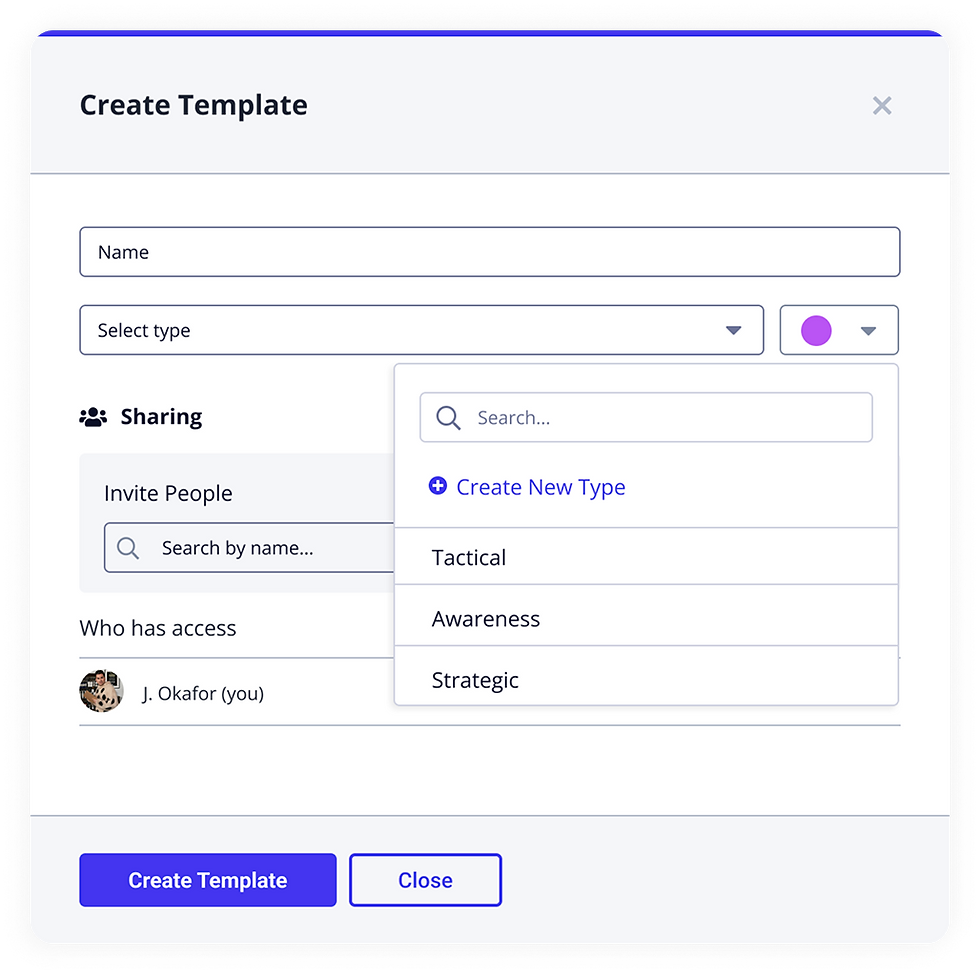
Select from saved templates
Browse and filter saved templates at the start of report creation.

03
Cloning for audience-specific versions
Analysts were often taking the same intel and repackaging it for different audiences, each with different expectations around detail, tone, and format.
Rather than forcing them to start from scratch every time, I designed cloning into the workflow so they could duplicate an existing report, preserve the core structure and content, and tailor it for a new audience.

04
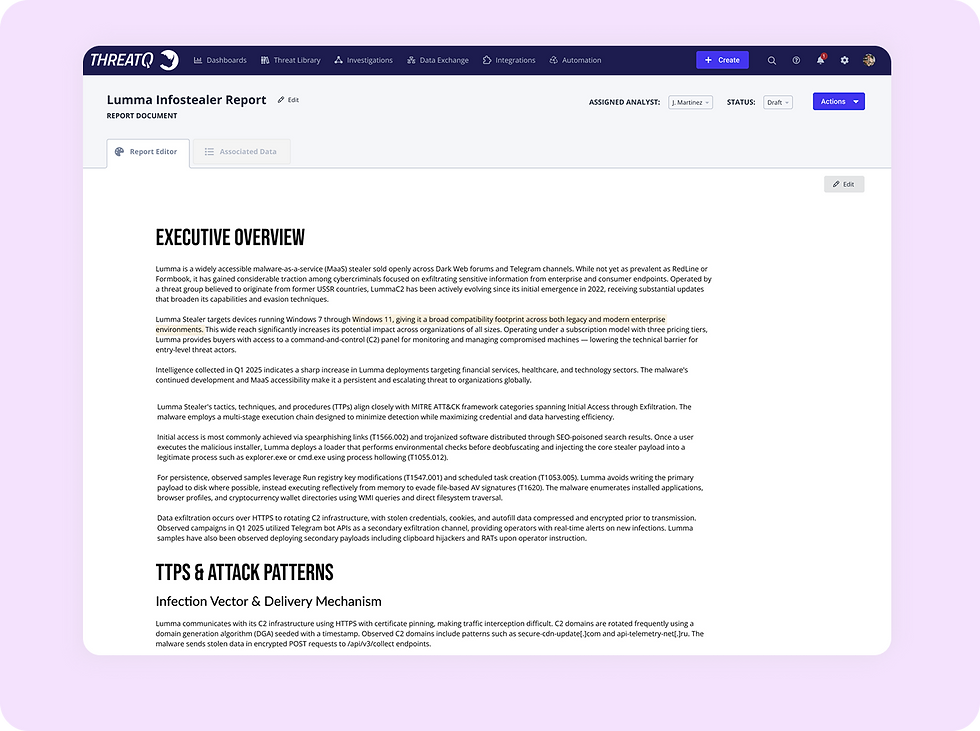
A focused editor connected to source data
Reports remained linked to their source object, with relevant metadata and supporting intelligence carried over automatically.
I kept the editor focused as a true writing space, while related source data lived in a separate tab alongside it. That gave analysts access to the context they needed without overwhelming the reporting experience or pushing them into external tools to finish the job
Constraints and Delivery Strategy
Reporting had to compete with larger strategic initiatives already on the roadmap, so I needed to prove it was both valuable and feasible.
During grooming, I found the early phases were mostly front-end work with minimal backend lift. That let me reframe reporting as a phased effort that could ship real user value without derailing other priorities
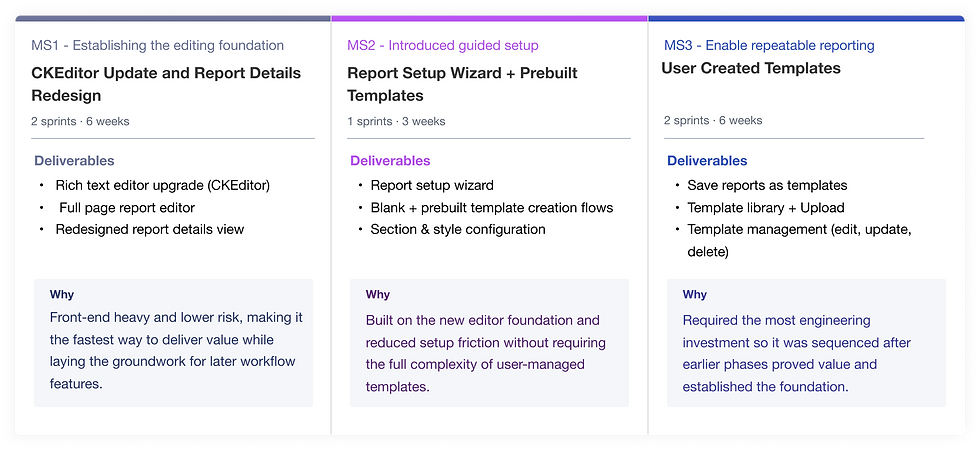
To get it prioritized, I partnered with engineering to break the work into scoped delivery bundles: sequenced milestones with clear epics, QA paths, and stakeholder sign-off. That gave leadership a realistic, incremental path forward.
Phased delivery breakdown
Sequenced to deliver early value while staying within engineering constraints.
How Reporting Unlocked AI
At the same time, ThreatQ was investing heavily in AI capabilities across the platform, including a summary briefing agent.
The AI briefing agent could generate a summary, but it had two problems. It had nowhere to go, and because it had no guidelines, the output wasn't shaped for anything an analyst could actually use. Reporting solved both.
The template gave the AI the context it needed: the right sections, the right report type, and the right audience. It also gave the output a place to land.
The result was a structured first draft the analyst could refine, rather than a generic summary they had to manually rebuild from scratch. I designed the two systems to work together deliberately so that the template informed the AI, and the AI gave analysts a real starting point.
AI briefing concept
Early exploration of AI-generated summaries: useful for quick context, but not structured or ready for reporting.

AI uses report structure
AI could generate a draft against a defined report structure, giving analysts a more usable starting point than a generic summary.

AI generates a structured draft
The output came through as a structured first pass that analysts could refine and turn into a final report.


Conclusion
During validation, customers walked through their existing workflow alongside the proposed one and estimated it would cut reporting time by around 40%. That signal was consistent across multiple teams, even without post-launch data to confirm it.
If I were to change something, I'd push to get reporting in front of users earlier, not to test the UI, but to stress-test the workflow assumptions.
We validated the problem well, but some structural decisions, like how templates would get managed at scale across a team, were still underexplored when the initiative shipped. The early phases were right to go when they did, but the foundation for what came next would have been stronger with more validation behind it.